FREE DELIVERY ACROSS THE CONTIGUOUS US!
PRICE PROMISE! FREE DELIVERY ACROSS THE CONTIGUOUS US


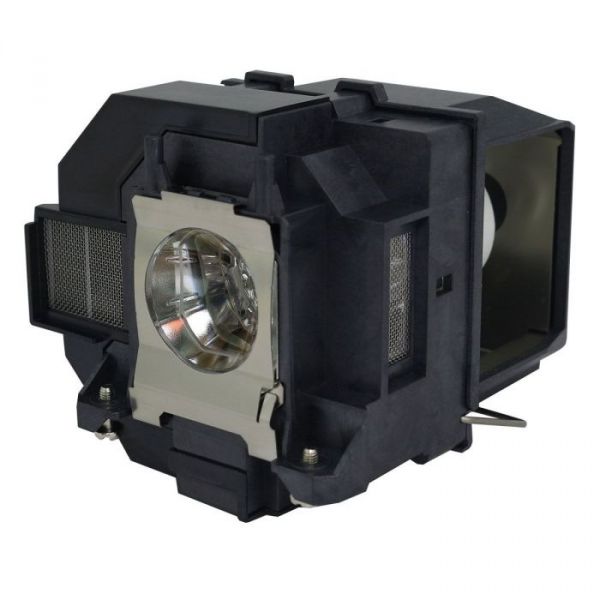


EPSON HOME CINEMA 2250 Projector Lamp
$38.97
Replacement lamp for the Epson Home Cinema 2250. This compatible lamp replaces Epson part ELPLP97 (V13H010L97) – a complete 210W lamp in a new housing that slides straight into the lamp bay, with up to 5,500 hours of rated life. The Epson Home Cinema 2250 is a home theater projector, so a fresh lamp makes the biggest difference to contrast and color in a darkened room – most owners notice the picture getting dimmer well before the lamp warning appears. 120-day warranty and free shipping from our US warehouse.
 7-10 DAY DELIVERY
SKU
102757-68102
- Easy to install - Drop-in replacement, no modifications required
- Premium quality compatible lamp - Built to meet or exceed OEM specifications
- 120 Day No Quibble Warranty - Any problems within 120 days and we will replace your lamp
- Government & Education Purchase Orders Welcome - Please email us or call for details
- Price Promise - Found it cheaper? Call us and we will try to beat any like-for-like price
Replacement Projector Lamp for the Epson Home Cinema 2250
| Fits | Epson Home Cinema 2250 |
|---|---|
| Replaces Epson part | ELPLP97 / V13H010L97 |
| Wattage | 210W |
| Rated lamp life | Up to 5,500 hours |
| Lamp type | Compatible lamp in new housing |
| Warranty | 120 days |
| Shipping | Free, from our US warehouse |
This lamp also fits
Epson Home Cinema 880, Epson Home Cinema 2200, Epson EH-TW710, Epson EH-TW5825, Epson EH-TW6250, Epson EH-TW5700, Epson EH-TW5705, Epson EH-TW5820, Epson EH-TW6150, Epson EH-TW740
About this lamp
This is a compatible replacement lamp module for Epson projectors that take the ELPLP97 lamp (Epson part number V13H010L97). It's a complete unit – a 210W bulb already fitted in a new housing – so there's no handling the bare bulb and no rewiring. Rated lamp life is up to 5,500 hours, and every lamp is tested before it leaves our US warehouse.
Compatible or Original Inside?
This is our compatible version: a quality third-party bulb in a new housing, built to match Epson's brightness and lamp-life specification at a much lower price, with a 120-day warranty. If you'd rather have a genuine Epson bulb, we also sell an Original Inside version for the Epson Home Cinema 2250 – a genuine Epson bulb in a new housing – which comes with a 180-day warranty.
When to replace the lamp
Epson projectors tell you when the lamp is near the end of its life: you'll see a "Replace the lamp" message when you switch on, and the lamp indicator may flash orange. Before that, most people notice the picture getting dimmer or colors looking washed out. If the projector won't light at all and the lamp indicator is red, the lamp has usually failed.
How to fit it
Switch the projector off, unplug it and let it cool for at least an hour. Undo the lamp cover screw, loosen the screws holding the old lamp and lift it out by the handle. Push the new lamp firmly into place, tighten the screws and refit the cover securely – Epson projectors won't power on if the cover isn't closed properly. Finally, reset the lamp timer: on most Epson models it's under Menu > Reset > Reset Lamp Hours, so the projector stops showing the replacement warning.
Questions
How do I know this is the right lamp? Check the model name on your projector, or the part number on the old lamp – if it shows ELPLP97 or V13H010L97, this lamp fits. If you're still not sure, contact our sales team and we'll confirm the right lamp for you.
Can schools and colleges order on a purchase order? Yes – government and education purchase orders are welcome. Email or call us and we'll set it up.
What if there's a problem? This compatible lamp has a 120-day no-quibble warranty: if there's a problem in that time, we'll replace it.
There are three types of replacement projector lamp, and we stock all three so you can choose the one that suits you best.
- Original – the manufacturer's genuine lamp. The whole unit, bulb and housing, is supplied by the projector manufacturer, such as Epson. 90-day warranty.
- VIVID Original Inside – a genuine manufacturer bulb fitted in a new compatible housing, giving you original-bulb brightness and lamp life for less. 180-day warranty.
- Compatible – a quality third-party bulb in a new compatible housing. Built to exacting specifications and tested before it ships, it's the most cost-effective option. 120-day warranty.
Not sure which lamp is right for your projector? Contact our sales team and we'll help you choose.
| Hours | 5500 |
|---|---|
| Watts | 210 |